Quickstart
This guide provides a basic example of how to use kmeanssa-ng to
perform clustering on a “quantum graph” and visualize the results. A
quantum graph is a metric space where points can exist not only on nodes
but also along the edges, allowing for more granular analysis.
Prerequisites
To run this entire guide, including the visualization step, you need to
install kmeanssa-ng with the plot extra:
pip install "kmeanssa-ng[plot]" # latest version
pip install "kmeanssa-ng[plot] == 0.6.1" # specific version
1. Generate a Sample Graph
First, we generate a stochastic block model (SBM) graph with two distinct communities. This graph will serve as our metric space.
from kmeanssa_ng import generate_sbm

# Generate a graph with two distinct communities
graph = generate_sbm(
    sizes=[40, 40],  # Two communities of 40 nodes each
    p=[
        [0.7, 0.01],  # High intra-community connectivity
        [0.01, 0.7],  # Low inter-community connectivity
    ],
)

# Note: Distances are automatically precomputed by default.
# The algorithm relies on distances between points on the graph,
# so generate_sbm() precomputes all-pairs shortest paths automatically.
2. Define the Data Distribution
The algorithm quantizes a probability distribution, not a fixed dataset.
We need to provide a set of observations that act as a representative
sample (a proxy) of this distribution.
In this example, our goal is to find centers for the uniform distribution over the nodes of the graph. We thus generate points sampled uniformly from the nodes.
from kmeanssa_ng.quantum_graph.sampling import UniformNodeSampling

# Sample points to serve as a proxy for a uniform data distribution
points = graph.sample_points(500, strategy=UniformNodeSampling(random_state=0))
3. Run K-means with Simulated Annealing
Now, we run the simulated annealing algorithm to find the cluster
centers. We specify the number of clusters (k=2) and other parameters
for the annealing process.
from kmeanssa_ng import SimulatedAnnealing, MostFrequentNode

sa = SimulatedAnnealing(
    observations=points,
    k=2,  # We know there are 2 clusters
    lambda0=1.0,  # Poisson-clock intensity: higher packs the same observations into a shorter annealing horizon (less exploration)
    beta0=1.0,  # Drift strength: higher pulls centers toward observations more strongly
    step_size=0.1,  # SDE time step
    random_state=0,  # reproducible run
)

# MostFrequentNode places each returned center exactly on a graph node,
# which is convenient for the node-based visualisation below. Initialisation
# defaults to KMeansPlusPlus.
centers = sa.run(robustification_strategy=MostFrequentNode(), robust_prop=0.1)

print("Cluster centers (position in edge):")
for center in centers:
    print(center)
Cluster centers (position in edge):
Center near node 62 [edge (62, 66), pos=0.000]
Center near node 47 [edge (47, 43), pos=0.000]
4. Visualize the Results
Finally, we visualize the graph and the resulting cluster centers.
The draw() method can color nodes based on a "cluster" attribute. To
get the cluster assignments, we use the assign_clusters() method. This
is a stateless operation that returns a list of cluster labels for a
given list of points. We can then use these labels to set the node
attributes for visualization.
import matplotlib.pyplot as plt
import networkx as nx

# Get the nodes as a list of points
nodes_as_points = graph.nodes_as_points()

# Assign each node to the nearest center and get the labels
labels = graph.assign_clusters(nodes_as_points, centers)

# Create a dictionary to map node IDs to cluster labels
node_to_cluster = {node.closest_node(): label for node, label in zip(nodes_as_points, labels)}

# Set the 'cluster' attribute on the graph for visualization
nx.set_node_attributes(graph, node_to_cluster, "cluster")

# Visualize the graph and clusters
fig, ax = plt.subplots(figsize=(10, 8))
graph.draw(
    ax=ax,
    color_by="cluster",
    centers=centers,
    node_size_by_obs=True,  # Show which nodes have more sampled points
    edge_color="grey",
)
plt.title("K-means Clustering on a Quantum Graph")
plt.show()
Warning: Node attribute 'obs_weight' not found. Using default size.
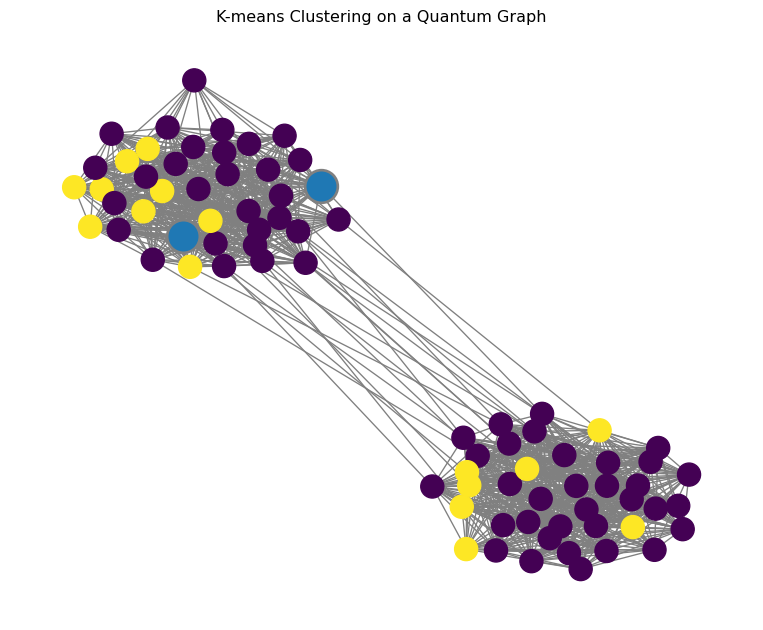
The resulting plot will show the two communities of the graph, with the nodes colored according to their assigned cluster and the cluster centers highlighted.